
About Handwriting to OCR: Team, Mission, and Contact
About the AI handwriting recognition tool that turns handwritten notes, photos, and scanned PDFs into editable text in 170+ languages.
Handwriting to OCR is an AI handwriting recognition tool that converts handwritten notes, photos, and scanned documents into editable text. It reads cursive, shorthand, and handwriting written over printed text, recognizes handwritten math equations and formulas, keeps tables and complex layouts intact, and supports over 170 languages. Export your results as Markdown, DOCX, or PDF, with images included.
Start for free — 5 free pages for new users. No credit card required. 170+ languages · PDF and common image formats · Works in your browser.
By the Numbers
| Figure | Title | Description |
|---|---|---|
| 5 | Free credits for new users | Every new account starts with 5 free credits, enough to recognize 5 pages. |
| 170+ | Languages supported | Handwriting in over 170 languages is recognized, and one page can mix several. |
| 11 | File types supported | Upload a PDF or one of 10 image formats, from JPG and PNG to HEIC. |
See Handwriting to OCR in Action
Compare the original handwritten page with the recognized text side by side. Highlighted blocks show exactly which text and images were recognized.
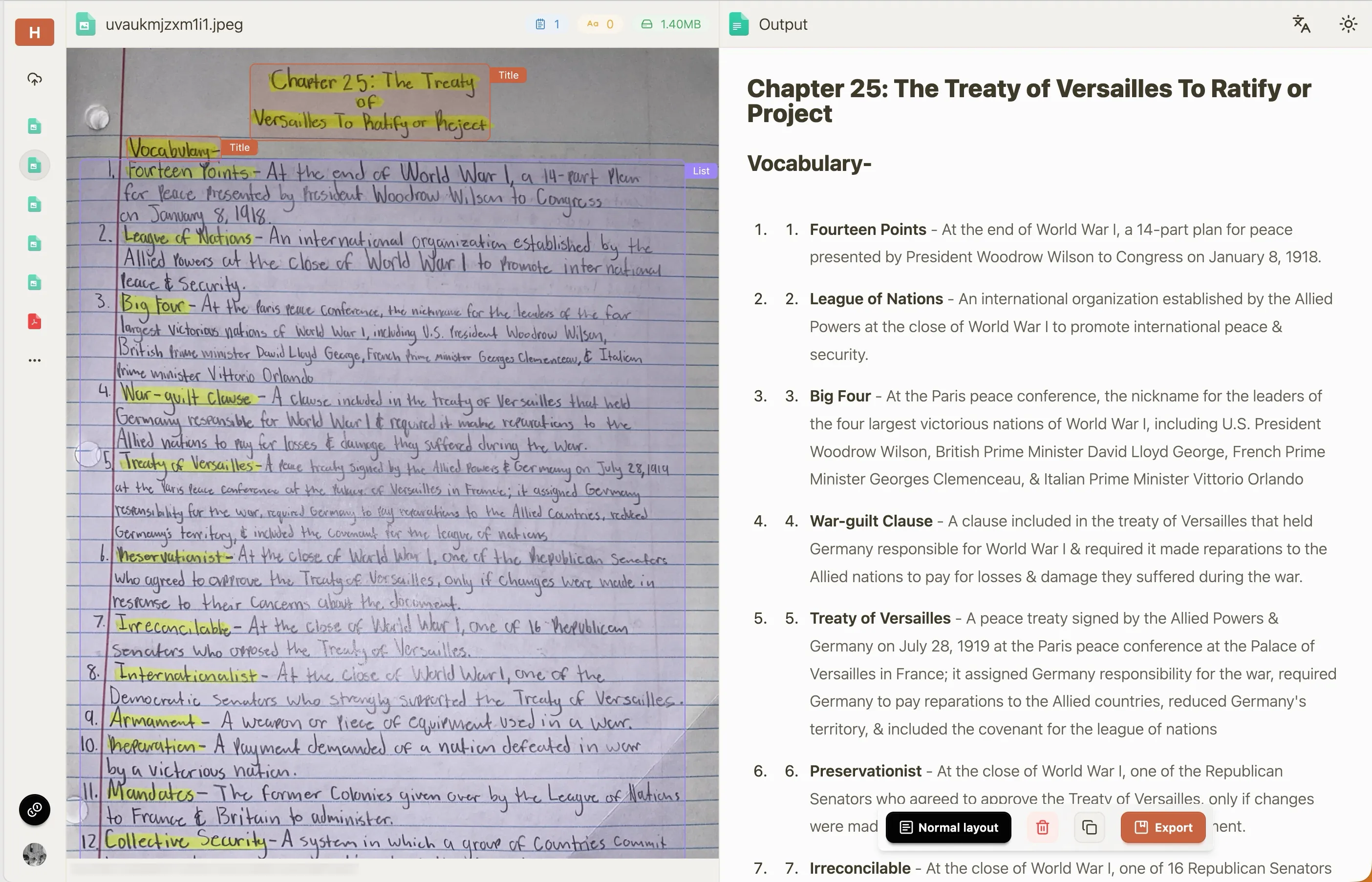
Left: original handwritten note. Right: recognized text.
The side-by-side view and highlights are desktop features. On a phone, the result fills the screen, and you can open the original at any time to check it side by side.
Why Choose Handwriting to OCR
Traditional OCR tools are built for printed text, so they often miss handwriting and lose complex layouts. Retyping by hand takes time and effort, so a lot of handwritten notes, forms, and letters never get searched, shared, or reused.
Handwriting to OCR is a handwriting recognition AI built for real handwriting: cursive, shorthand, marginal comments, and handwriting written over printed text all come through, and accuracy stays high on pages with complex layouts.
- Built around real handwriting. It reads hurried notes, joined-up cursive, and shorthand, not only clean printed text. The result sits next to the original, and on desktop, highlighted blocks show exactly which text and images were recognized.
- Handwritten math. Handwritten equations, fractions, exponents, and square roots are recognized and rendered as formatted math.
- Faithful layout display. Print layout reads where each text block sits on the original page and mirrors those positions in the result view. To keep that placement in an exported file, switch to Print layout and export as PDF.
- Beyond plain text. Tables, headers, footers, quotes and lists keep their structure, so the result reads like the original page.
- Over 170 languages. One page can mix languages, and each part is recognized.
What Handwriting to OCR Can Recognize
Handwriting to OCR reads more than handwritten words. It recognizes the text, tables, equations, and images on a page, and it keeps the structure of the page, so the exported file stays close to the original.
Messy Handwriting and Cursive
Handwriting to OCR reads hurried notes, joined-up cursive, and shorthand. It also handles marginal comments and handwriting written over printed text, so the words you need are not lost in the mix of print and ink.
Headings, Lists, and Quotes
Titles, section headings, bullet points, numbered lists, and quoted passages are recognized as separate blocks. The Markdown output keeps their hierarchy, and the DOCX export carries the headings over, so the outline of the original page is preserved.
Tables
Handwritten and printed tables are recognized row by row and column by column. Schedules, order forms, and grids are exported as tables, so their structure is not flattened into loose lines of text.
Math Equations and Formulas
Handwritten equations, fractions, exponents, and square roots are recognized and rendered as formatted math. A handwritten quadratic formula, for example, appears as a readable equation rather than a line of plain text.
Inline Images and Illustrations
Logos, diagrams, sketches, and illustrations are extracted as images and included in the export. In Markdown, they are saved as separate image files. In DOCX, they are embedded in the document.
Mixed Languages
A single page can combine several languages. Handwriting to OCR recognizes over 170 languages, so a page that switches between languages is handled in one pass.
How OCR Handwriting to Text Works in 3 Steps
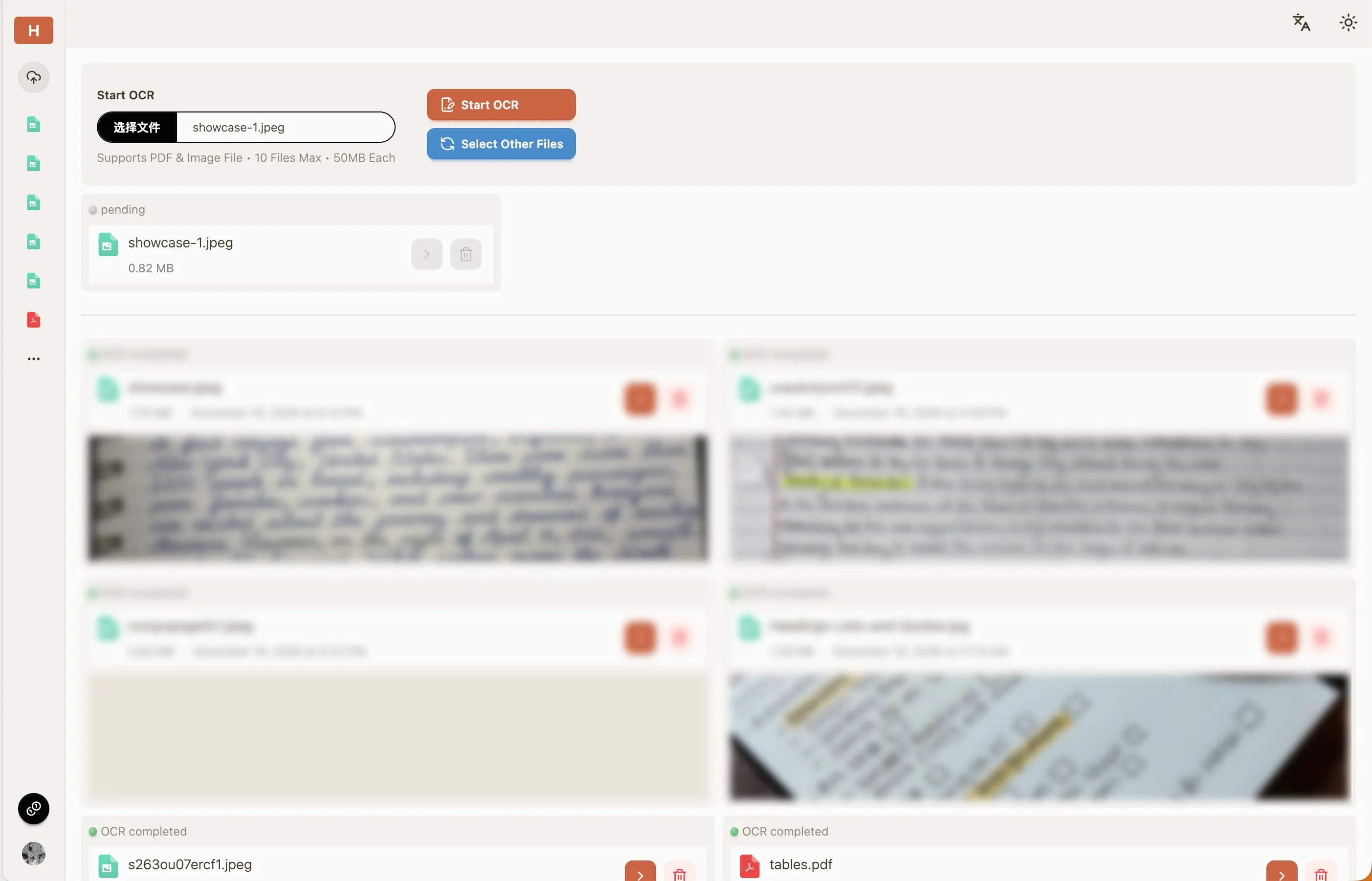
- Scan handwriting into text. Upload a photo, image, or PDF of notes, journals, or tables, a scanned document, or a copy of a book or paper.
- Let the AI process it. The AI recognizes handwriting, tables, equations, images, and page layout. Most files finish in 10 seconds to 1 minute, depending on file size and length.
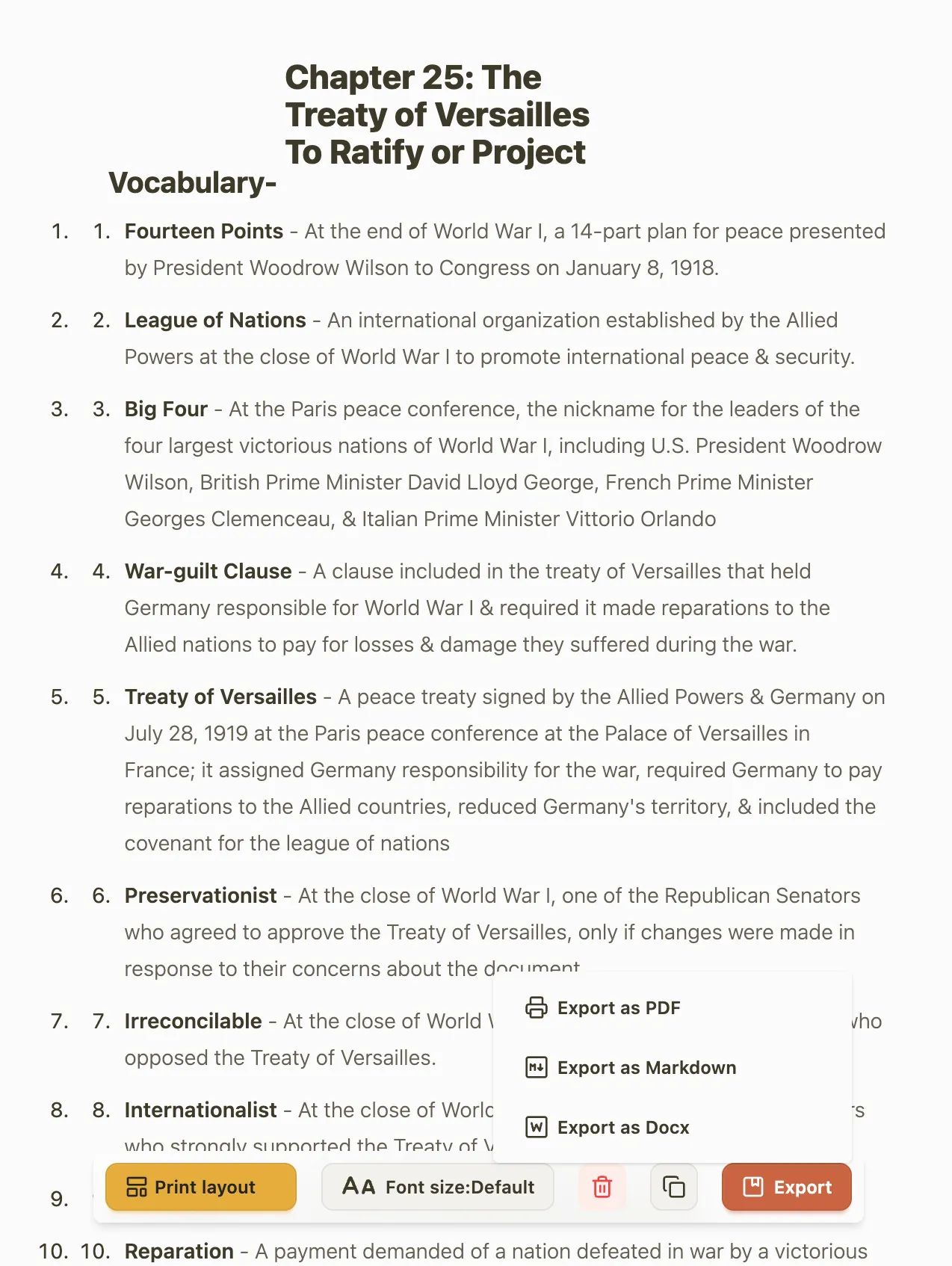
- Review and export. Check the text against the original side by side, then export it as Markdown, DOCX, or PDF.
Key Features of Our Handwriting OCR AI
- Markdown, DOCX, and PDF export. Edit the result in any text editor or in Word, or share it as a PDF. Images from the original, such as logos and illustrations, are included in the export.
- Fast results. Most files finish in 10 seconds to 1 minute, depending on file size and length.
- Use it anywhere. It works in your browser on PC or phone. Nothing to install.
- Privacy first. Your documents stay yours. File transfer uses HTTPS, and storage is encrypted at rest on cloud infrastructure. Files are shared with a third-party service provider only to provide the OCR service; they are never sold or used for advertising. If you delete an OCR record, all associated files are deleted with it.
Who Uses Handwriting to Text Recognition
Handwriting to text recognition helps people in many fields turn handwritten material into text they can search, share, and reuse.
- Students: Turn lecture notes and whiteboard photos into editable Word or Markdown files. Sort exam mistakes by topic. Pull quotes from books and papers without retyping.
- Journalists and media professionals: Turn interview shorthand and draft notes into text. Make press clippings and archives searchable. Turn press conference notes into copy faster.
- Lawyers and legal professionals: Digitize handwritten contract annotations, court notes, and old case files. Extract contract clauses and compare revisions.
- Office workers: Turn whiteboard and meeting notes into structured documents. Convert paper tables and schedules into tables you can copy into a spreadsheet.
- Small business owners, finance, and operations teams: Read handwritten work orders and timesheets. Pull amounts, dates, and names from receipts and invoices. Turn customer forms into digital records.
- Families and personal archives: Preserve old letters, handwritten diaries, and family recipes. Back up ID documents and household records.
Three examples of how it fits into everyday work:
Example 1: Lecture notes into an editable Markdown file. A student photographs a page of handwritten lecture notes and uploads it. The result is structured text in a Markdown file, which can be edited in any text editor or note app.
Example 2: Whiteboard notes into a Word document. After a brainstorming session, an office team photographs the whiteboard and uploads the photo. Exporting as DOCX gives them an editable document that they can revise and share in Word.
Example 3: A handwritten letter into a family archive. A family scans a letter written by a grandparent. Exporting as DOCX keeps the text together with any illustrations on the page, so the letter can be printed, shared, or stored.
Supported Formats and Languages
Handwriting to OCR accepts PDFs and common image formats, and recognizes handwriting in over 170 languages.
What you can upload
Phone photos, scans, and PDFs. Up to 50 MB per file, and up to 10 files at a time.
- Documents: PDF
- Images: JPG, JPEG, PNG, AVIF, TIFF, GIF, HEIC, HEIF, BMP, WEBP
Export formats
- Markdown: editable text for any text editor or note app. Images are saved as separate image files.
- DOCX: open and edit in Word. Images are embedded in the document.
- PDF: export in the Print layout, and the PDF keeps the original layout.
Languages
Over 170 languages are recognized, and a single page can mix several. Common languages include English, French, German, Spanish, Portuguese, Italian, Polish, Russian, Arabic, Chinese, Japanese, Vietnamese, and Thai. For the full list, see the Mistral language documentation.
Simple Pay-As-You-Go Pricing
No subscription. Pay only for what you use.
- New users get 5 free credits.
- 1 credit = 1 page of OCR.
| Pack | Credits | Price |
|---|---|---|
| Lite | 100 | $9.90 |
| Pro | 1,200 | $19.90 |
| Ultra | 8,000 | $99.00 |
When your credits run out, top up on the buy credits page.
Frequently Asked Questions About Handwriting to OCR
Which file formats are supported? PDF and common image formats, including JPG, JPEG, PNG, AVIF, TIFF, GIF, HEIC, HEIF, BMP, and WEBP.
Is there a file size limit? Each file can be up to 50 MB, and you can upload up to 10 files at a time.
How many languages can Handwriting to OCR recognize? Over 170 languages, covering most major languages around the world, including English, Chinese, Japanese, Arabic, Russian, and Vietnamese. Mixed-language pages are supported.
Can I run OCR from handwriting on a phone photo? Yes. Take a photo of your handwritten page with your phone and upload it directly. Phone formats such as JPG, PNG, and HEIC are supported.
How do I export my results? Export as Markdown, DOCX, or PDF. In Markdown, images are saved as separate image files. In DOCX, images are embedded in the document. PDF export follows your current layout mode: in the Print layout, the exported PDF keeps the original layout, with each page matching the orientation of the original page and equations rendered as formatted math. Exporting as PDF opens your browser’s print dialog; choose Save as PDF to finish.
Can I use Handwriting to OCR for free? Yes. New users receive 5 free credits, enough to process 5 pages, such as 5 images or a 5-page PDF. No credit card required. When you need more, buy credits as you go. There is no monthly subscription.
How do you protect my privacy? We take your privacy seriously. Your files belong to you, and we treat them with care from the moment you upload them until you choose to delete them. File transfer uses HTTPS, and storage is encrypted at rest on cloud infrastructure. Files are shared with a third-party service provider only to provide the OCR service; they are never sold or used for advertising. If you delete an OCR record, all associated files are deleted with it.
How accurate is the recognition? Accuracy depends on how clear the handwriting is and on the quality of the photo or scan. Use the side-by-side view to check the result against the original. Highlighted blocks show exactly what was recognized, which makes checking faster.
Does it keep equations and tables? Yes. Handwritten equations are rendered as formatted math, and tables are recognized row by row and column by column.
Does it keep headings and page layout? Yes. Titles, section headings, lists, quotes, headers, and footers are recognized and kept in the output, so the result follows the structure of the original page.
Can I get a refund? Yes. Unused credits can be refunded in full within 14 days of purchase; see the refund policy for the full terms.
Start Converting Your Handwriting Today
Upload your first file and get 5 free pages. No credit card required.